Showing posts with label Mac. Show all posts

Friday, January 31, 2014

Get Google Now on PC/Mac

 Chrome Canary

Google Now is a personal assistant service, something on the same lines with Apple’s Siri, but far more powerful. Google Now brings you just the right information, at just the right time. Weather, traffic, transit schedules, even the latest scores come automatically, just as you need them. Google Now is available for iOS and Android, but sadly, those of you who bought Ice-cream sandwich devices, and still haven't received a Jellybean update are refrained from using Google Now. Google Now, not being an easily installable app (like other Android apps), you might have to change you phone’s ROM or flash a Google Now flashable zip for ICS Android. google-now-chrome-mac
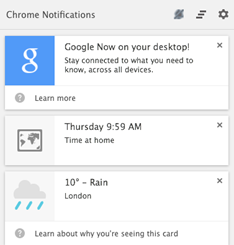
Google Canary is a developer/early adopter’s version of Google Chrome. If you install Google Canary, you have an option to enable Google Now. Google Now works like a packaged app on PC/Mac. Once you have installed Chrome Canary, just open chrome://flags/#enable-google-now and select enable from the drop down menu. Sign-in to Google Chrome and you are ready to roll. Google Now on PC/Mac will not only show almost every card that is available on Android or iOS, but also notifications from packaged apps like Gmail, Any.Do, Pocket.

google now steps


Steps to get Google Now on PC/Mac

1. Download and install Google Canary.

2. Open chrome://flags/#enable-google-now URL in Chrome Canary.

3. Enable Google Now.

4. Relaunch Chrome.

Google Now will be ready, waiting for you in the notification tootlbar for you PC/Mac.

Important links : Google Now | Google Canary | Tip Via : Chrome Blog

Google Now for Android | Google Play Store

Google Now for iOS | iTunes App Store

Google Now flashable zip for ICS Android | XDA developers

Tuesday, December 24, 2013

Google Maps : Offline Maps and more

Google-Maps-Logo

The new Google Maps comes with an amazing cards based UI and is very user friendly, but the ability of caching maps for offline viewing isn’t very obvious. Power saving is crucial while traveling and we don’t want to waste power and mobile data on Google Maps. Tablet users usually end up using sinuous ways like using a hotspot or looking for a Wi-Fi network availability just to peek at a map. Luckily Google does not hate its users and soon two methods surfaced that could cache maps seamlessly.


1. “Okay Maps”

IMG_20131224_131418

The first one is an Easter egg. All you have to do is touch the little microphone button (image) on the right side of the search bar and say “Okay IMG_20131224_131451Maps” or you can just type it in the search box. The application will start caching the on-screen map area, with a notification showing  current progress. When the process ifIMG_20131224_131240 complete, the application displays another notification to indicate the completion of the task.

2. The standard method

SkitchThe standard method is to tap the search bar and scroll down to the very bottom of the Google Places integration, recent places and other parts of the list. There lies the button saying “Make this map area available offline”. Again, it will trigger the “Pre-loading map..” notification. Once finished you can use Google Maps with or without an internet connection.

You can also use the web-app to get the directions and download them for offline use.

Google Maps | Web

Google Maps | Google Play

Google Maps | App Store


Screenshots edited using Evernote Skitch. All screenshots are taken on Asus Google Nexus 7 2013. HTML Translator – Windows Live Writer.

Friday, November 22, 2013

Super Sync Sports : Use your phone as a controller

Super Sync SportsThe Best Google Chrome Experiment yet. Google’s Super Sync Sport is a simple sports game and the aim race in different sports – Running, Swimming or cycling. What makes it different? Use of mobile phones as controllers. Upto 4 players can participate in a race, choose adorable characters from a huge roster and Get Set Race!!

Open Super Sync Sports on Google Chrome or download the Chrome app. Grab your phone(s) or tablet(s) and visit g.co/super. Enter Code to connect to the same session and start playing. Up to four players can join in every race.

Requirements:

  • A Computer that can run Google Chrome (Duh!)
  • Phone(s)/Tablet(s) (Android 4.0+ and iOS 4.3+) with Google Chrome installed.
  • Internet connection on all devices including the computer.

Super Sync Sports uses new browser technologies like the HTML5 audio, CSS3 and Canvas, and the Touch API to recognize the gestures you make on your mobile device and WebSockets to make sure your phone(s) and browser stay in sync similar to Remo Music player.

Super Sync Sports

Super Sync Sports | Web app | Google Chrome WebStore

World Wide Maze

WWMWe all know Teeter – the hugely popular ball and maze game. Now imagine any webpage as your maze board, add some fabulous graphics and some great 3D paths and you get ‘World Wide Maze’. Use your Android/IPhone or just your computer to play all you need is Google Chrome. This Chrome Experiment might be the best maze puzzle ever. You will never be bored of this because every webpage is a new playground. Just enter the URL or run a Google search and you are ready to go.

Gameplay–World Wide Maze

Hats-Off to Google Chrome Japan for this brilliant innovation.

World Wide Maze | via Chrome Experiments

Tuesday, October 8, 2013

Action(s) : Your Personal Automation Assistance

Actions icon Action(s) is a Java app that aims to automate repetitive tasks like batch rotate photos, batch rename files, batch QR processing and a lot more. Such tasks are very easy to perform but are really time consuming. Action(s) lets you create a workflow by simple drag and drop scheme for every step in the process.

Action(s) is extremely lightweight (just about 2 KB) being a java app. Action(s) is very easy to use javaand if you tinker with it for about an hour, you will be quickly, efficiently and effortlessly commanding this software to perform your tasks.

Action(s) can do in seconds and minutes what would take you hours to do by hand. It gives you direct access and control of all the functionalities of your computer: file management, photo edition, Internet, emails.

How-To Automaate Windows Tasks Using Action(s) | via groovyPost.com

Besides the huge default set of actions you can perform using Action(s), you can download even more packages here.

To get this automation tool you must install Java, click here to download Java.

| via groovyPost

Friday, October 4, 2013

Flutter

Flutter IconIt has been almost an year since I posted an article about Flutter – an app that lets you control music with hand gestures. I’m re- reviewing Flutter because of two reason : First, Google acquired Flutter and second Flutter now has a Chrome extension that lets you use your webcam to control Netflix, YouTube, Grooveshark and Pandora. With added support to Spotify and Netfilx on Windows and Mac, Flutter’s Desktop app has a few updates too including the ability to control your Powerpoint slideshows. Put your hardware to use now with Flutter.

You can download the Flutter Chrome Extension from Chrome Web Store or by right-clicking on the Flutter icon in the notification tray.

for Windows

– Chrome Extension | Chrome Web Store

| Mac App Store

Friday, August 16, 2013

Kiwix : Get Wikipedia Offline


330px-Kiwix_logo_instaler.svgWikipedia, the single most trusted source of all human knowledge can now be carried on a USB flash drive so you can ‘wiki’ stuff in the middle of an ocean, at the top on a mountain or in the jail. Kiwix is an open source project that allows you to carry the whole Wikipedia on different platforms like Windows, GNU/Linux, Mac OSX and Android. One can download the whole Wikipedia in English language in just ~18 GB. This highly compressed treasure of knowledge can be compressed even more by downloading the content without images. Apart from all this the full text search engine and PDF/HTML export.

You can download Kiwix here.

The Android package can be downloaded from Google Play Store here.

Kiwix : via Ghacks

Monday, December 17, 2012

MiniLyrics


Add a lyrics Plug-in to Your Favorite Music Player


logo MiniLyrics (by Crintsoft)

  Click here to Download   Click here to Download (click on the logo to download)
  • MiniLyrics is a cross platform plug-in for music apps that allows you to view a smooth lyrics scroll for your music.
  • It automatically searches and downloads lyrics for your music.
  • Amazing translucency skins.
  • It supports a lot of music players like Winamp, Windows Media Player,iTunes, MediaMonkey, Spotify, Zune, Album Player, Helium Music Manager, JetAudio, Foobar2000,Songbird, AIMP2, The KMPlayer, J. River Media Center, J. River Media Jukebox, Quintessential Player, BSPlayer, Silverjuke, XMPlay, VLC Media Player, Media Player Classic Home Cinema,MusicBee.
  • It also comes with a easy to use lyrics editor and amazing translucency skins.

Click here to Download(Also available for android devices)
You can visit the developers here .

Screenshot
Screenshot (2)

Wednesday, October 10, 2012

Music Controlling using just Hand Gestures


Hand Gestures to control music


Among all the apps we use for our music, the prima facie feature is the playback control. The control over play/pause, changing tracks is what make you like a player. Beside UI, other features like syncing devices, internet radio, etc. are almost the same. Today I’ll cover 2 FREE apps, that lets you control music with simple hand gestures like a wave or holding up your palm.
This Week for Android: Sensor music player.
PC and Mac:  Flutter

1. Flutter

macwindows_vista_logo1(Click on the icons to download)
Flutter is like the kinect for PC or Mac. It works smooth and quick. A great compact app (3.3MB) works in the background consuming not more than 16MB of RAM. It uses image processing algorithms with response time less than 2 seconds. Compatible with Windows Media Player, iTunes, Winamp and Spotify. Surely a must have for plugin.
The Features I loved the most are:
  • Great response time.
  • Notification on Play/Pause.
  • Easy to use.
To visit the developers blog click here. To visit their website click here.

2. Sensor music player

android-logo-small(Click on the icons to visit download page)
Sensor music player features a lot of options to control your music. Waving over proximity sensor, shaking the phone, taping the surface on which it rests or pocketing the phone to play/pause, music change tracks, etc..It’s not only easy to use but also cool. The major issue with this app is that it drains the battery rapidly. The app is not very usable but totally worth a try. The UI is great, the equalizer is customisable and the sensor settings can be adjusted too. Finally a great app to play pranks on children.

Friday, September 28, 2012

Downloads Of The Week ( 39 2012)


Downloads Of The Week


It's time to wake up, September is about to end. This week we will see 4 awesome apps for Android, iPhone, Windows phone, Mac and Windows PC. You might not have heard about any of these apps, but they are are worth the price. Ironically every app in this week's post is Free.
This week for Android : RunPee and Shush!
For Windows PC : Runpee, Fences and MediaCoder.


1.RunPee Because movie theaters don't have pause buttons.


Click on the logos above to download.
(Symbian, PC and Mac users can use this too, visit www.runpee.com on your device or computer)

The movies often skip the intermissions these days, so when you need to attend a call from your parents, boss, friend or even nature, you have to miss the movie. RunPee is a smart app for you Android devices and Iphone, now also available on Windows PC. RunPee tells you the best times to Run and Pee during a movie without missing anything. The app fetches time slots in the movie, which are relatively boring and which can be 'missed', they call such times 'Pee times'.

The feature I loved the most are:

  • The Flashlight is just like other flashlight apps but now integrated with RunPee. So when you roam around the dark theaters, you never get lost.
  • RunPee has a timer which you start as the movie begin, the app fetches Pee times and vibrates 2 minutes before Pee times.
  • When on a Pee break, the app gives you the ongoing plot which you are "missing" without any spoilers.
  • If you are running late, just read the plot for the missed part right from RunPee.
  • Finally Check-ins,facebook share, IMDb and rotten tomatoes reviews are also available on this app.


Click here to never miss a movie again.


2.Shush!


Click on the Android logo to download.
I have been using this app for over 6 months now. When we turn off the ringer, we often forget to turn it back on. Shush! does this for you and makes it fun too. The awesome GUI, makes it simpler to use.
The Features I loved the most are:
  • Extremely light weight. (about 120Kb)
  • Great circular ring control.
  • Pops up every time you put the phone on silent or vibrate.
  • Customizable colors.

Click here to visit the developers website.


3.MediaCoder The universal Audio/Video Transcoder.

 MediaCoder is a simple to use, fast, anything to everything converter,editor and clipper. It supports almost every format for transcoding audio/video. Just about 45Mb for Windows(x64) full edition and is available for free on every platform. Preinstalled devices like itouch, PSP and various other makes transcoding very easy. MediaCoder comes in 5 different packages
  1. MediaCoder Full Edition.
  2. Audio Coder.
  3. MediaCoder Web Video Edition.
  4. MediaCoder Devices Edition.
  5. MediaCoder CLI version.

The Features I loved the most are:
  • Extremly easy to use.
  • Works efficiently in background.
  • Preset devices.
  • Auto Shutdown/Sleep/Hibernate after transcoding is complete.

Click here to visit MediaCoder website.

4. Fences

Windows might bring a brand new taskbar, but it doesn't do much to improve upon the main desktop itself. Fences is a great way to make your desktop organised, by arranging and sorting icons into various 'fences' or labelled shaded areas in a well-presented manner. Fences make life a lot easier.
The Features I loved the most are:
  • It keeps things organised.
  • Double-click to hide all icons.
  • It give the desktop a new look.
Click here to visit fences home page.
Google