Showing posts with label Google. Show all posts

Friday, January 27, 2017

Quick Draw


Quick, Draw!

I've always been a fan of Google's Chrome Experiments like Super Sync Sports or 100,000 stars. This new experiment called Quick, Draw! lets you play the beloved party favorite - PICTIONARY!! (.. with an AI). This is a game based on a neural network. Every time you draw something the neural network tries to guess what are you drawing; And whilst doing so you are actually training the network too. From animals to objects, or from a rollercoaster to a laptop, you get to draw a lot of things. You can also see what others have drawn before, by clicking on the pictures you have drawn, at the end of each round. Although using a device with a touch input is much easier (for you too draw... the A.I is quite smart) using a mouse or any pointing device should work fine.

Quick, Draw! | via A.I Experiments with Google.

Thursday, February 13, 2014

Google Search Volume by Language : Chrome Experiment

Earth

The internet is beautiful, yet another Chrome experiment is here to support this argument. It’s open source and it’s amazing. I know it isn’t very useful, but it’s smart. Give it a try, playing around this was the best spent minute for me today.

Google Search Volume by Language | via Inside Google Search : Playground

Friday, January 31, 2014

Get Google Now on PC/Mac

 Chrome Canary

Google Now is a personal assistant service, something on the same lines with Apple’s Siri, but far more powerful. Google Now brings you just the right information, at just the right time. Weather, traffic, transit schedules, even the latest scores come automatically, just as you need them. Google Now is available for iOS and Android, but sadly, those of you who bought Ice-cream sandwich devices, and still haven't received a Jellybean update are refrained from using Google Now. Google Now, not being an easily installable app (like other Android apps), you might have to change you phone’s ROM or flash a Google Now flashable zip for ICS Android. google-now-chrome-mac
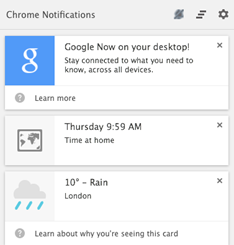
Google Canary is a developer/early adopter’s version of Google Chrome. If you install Google Canary, you have an option to enable Google Now. Google Now works like a packaged app on PC/Mac. Once you have installed Chrome Canary, just open chrome://flags/#enable-google-now and select enable from the drop down menu. Sign-in to Google Chrome and you are ready to roll. Google Now on PC/Mac will not only show almost every card that is available on Android or iOS, but also notifications from packaged apps like Gmail, Any.Do, Pocket.

google now steps


Steps to get Google Now on PC/Mac

1. Download and install Google Canary.

2. Open chrome://flags/#enable-google-now URL in Chrome Canary.

3. Enable Google Now.

4. Relaunch Chrome.

Google Now will be ready, waiting for you in the notification tootlbar for you PC/Mac.

Important links : Google Now | Google Canary | Tip Via : Chrome Blog

Google Now for Android | Google Play Store

Google Now for iOS | iTunes App Store

Google Now flashable zip for ICS Android | XDA developers

Tuesday, December 24, 2013

Google Maps : Offline Maps and more

Google-Maps-Logo

The new Google Maps comes with an amazing cards based UI and is very user friendly, but the ability of caching maps for offline viewing isn’t very obvious. Power saving is crucial while traveling and we don’t want to waste power and mobile data on Google Maps. Tablet users usually end up using sinuous ways like using a hotspot or looking for a Wi-Fi network availability just to peek at a map. Luckily Google does not hate its users and soon two methods surfaced that could cache maps seamlessly.


1. “Okay Maps”

IMG_20131224_131418

The first one is an Easter egg. All you have to do is touch the little microphone button (image) on the right side of the search bar and say “Okay IMG_20131224_131451Maps” or you can just type it in the search box. The application will start caching the on-screen map area, with a notification showing  current progress. When the process ifIMG_20131224_131240 complete, the application displays another notification to indicate the completion of the task.

2. The standard method

SkitchThe standard method is to tap the search bar and scroll down to the very bottom of the Google Places integration, recent places and other parts of the list. There lies the button saying “Make this map area available offline”. Again, it will trigger the “Pre-loading map..” notification. Once finished you can use Google Maps with or without an internet connection.

You can also use the web-app to get the directions and download them for offline use.

Google Maps | Web

Google Maps | Google Play

Google Maps | App Store


Screenshots edited using Evernote Skitch. All screenshots are taken on Asus Google Nexus 7 2013. HTML Translator – Windows Live Writer.

Friday, November 22, 2013

Super Sync Sports : Use your phone as a controller

Super Sync SportsThe Best Google Chrome Experiment yet. Google’s Super Sync Sport is a simple sports game and the aim race in different sports – Running, Swimming or cycling. What makes it different? Use of mobile phones as controllers. Upto 4 players can participate in a race, choose adorable characters from a huge roster and Get Set Race!!

Open Super Sync Sports on Google Chrome or download the Chrome app. Grab your phone(s) or tablet(s) and visit g.co/super. Enter Code to connect to the same session and start playing. Up to four players can join in every race.

Requirements:

  • A Computer that can run Google Chrome (Duh!)
  • Phone(s)/Tablet(s) (Android 4.0+ and iOS 4.3+) with Google Chrome installed.
  • Internet connection on all devices including the computer.

Super Sync Sports uses new browser technologies like the HTML5 audio, CSS3 and Canvas, and the Touch API to recognize the gestures you make on your mobile device and WebSockets to make sure your phone(s) and browser stay in sync similar to Remo Music player.

Super Sync Sports

Super Sync Sports | Web app | Google Chrome WebStore

Z-Type : Type to Shoot

Playing games can improve your hand-eye coordination, stimulate quick thinking and reduce reaction time. A lot of games help you learn how to fly an aircraft or be more social. Z-Type is a HTML5 game that helps you type faster. A simple, 2D, type to shoot game is a better alternative those boring softwares that are suppose to help you type faster. Dominic Zsablewski is a developer/blogger who has created games like Z-type, X-type, Biolab disaster, Drop, etc. All these games can be played on a browser, some have mobile browser compatibility too.

largeKilling time on Dominic’s webpage is really easy. It’s the place to find a lot of games, good reads and a lot of other stuff for free. Undertaking such projects brings out the potential of HTML5. Developing web apps instead of mobile apps or downloadable content is a better choice, as no one wants to download and install stuff when they get bored. All they have to do is open a web page and start playing.

Follow the Chrome Experiment here.

Z-type X-type | via Dominic Zsablewski

Biolab disaster | Google Play | App Store

100,000 Stars

If you think Google SkyMap is awesome, wait till you see 100,000 Stars. It’s a Google Chrome Experiment programmed by some space enthusiasts at Google. With highly immersive and interactive experience, this web app also displays tooltips from Wikipedia, making it informative. According to Google Chrome Experiments 100,000 Stars shows the location of 119,617 nearby stars.

Google's Joke

You can get started with the brief tutorial or just jump in with and travel the universe. Panning, zoom in, zoom out everything can be done with your pointing device. Click the star name to learn more things about it like the name of the discoverer, distance from Earth, approximate age and other information.

100000 stars

1000,000 Stars | via Chrome Experiments

World Wide Maze

WWMWe all know Teeter – the hugely popular ball and maze game. Now imagine any webpage as your maze board, add some fabulous graphics and some great 3D paths and you get ‘World Wide Maze’. Use your Android/IPhone or just your computer to play all you need is Google Chrome. This Chrome Experiment might be the best maze puzzle ever. You will never be bored of this because every webpage is a new playground. Just enter the URL or run a Google search and you are ready to go.

Gameplay–World Wide Maze

Hats-Off to Google Chrome Japan for this brilliant innovation.

World Wide Maze | via Chrome Experiments

Thursday, November 21, 2013

Google Play Newsstand : Magnet for everything you love

Google Play NewsstandRecently Google launched a new app for Android called the Google Play Newsstand. It’s a consolidation of Google Currents and Play Magazines with a Cards based UI. Newsstand manages subscriptions of newspapers and magazines directly from Google Play. Unlike standalone apps by newspaper publishers and free content subscription apps like Flipboard and Google Currents, Newsstand offers paid subscriptions for high profile publications too. ScreenshotScreenshot

The features that make Google Play Newsstand the best newsreader app yet are

  • Read Now – Breaking news, trending articles and even subscription recommendations.
  • Bookmarks – Offline access for reading articles later similar to Pocket or Instapaper.
  • It automatically imports Google Currents and Google Play Magazines subscriptions.
  • Automatic tagging each article like “Android” or “Xbox One”. Reading related articles is just one tap on the tag away.
  • Full HD support and simple UI

The Offline mode solves the problem Currents had with high data and battery usage. Newsstand widely uses Google’s machine learning in tagging articles and finding newer and more enjoyable subscriptions for you to read.

You can subscribe to TechMef’s RSS feed here.

Google Play Newsstand | Google Play Store via The Verge

Friday, October 4, 2013

Flutter

Flutter IconIt has been almost an year since I posted an article about Flutter – an app that lets you control music with hand gestures. I’m re- reviewing Flutter because of two reason : First, Google acquired Flutter and second Flutter now has a Chrome extension that lets you use your webcam to control Netflix, YouTube, Grooveshark and Pandora. With added support to Spotify and Netfilx on Windows and Mac, Flutter’s Desktop app has a few updates too including the ability to control your Powerpoint slideshows. Put your hardware to use now with Flutter.

You can download the Flutter Chrome Extension from Chrome Web Store or by right-clicking on the Flutter icon in the notification tray.

for Windows

– Chrome Extension | Chrome Web Store

| Mac App Store

Thursday, September 26, 2013

Best Of Chrome : Text


textText.app is a simple text editor for Chrome OS and Chrome. It’s Fast, allows multiple file editing at once, has syntax highlighting and syncs with Google Drive on Chrome OS. The Chrome app is available on Chrome Web Store.

Text by joshwoodward@google.com | Chrome Web Store

Best Of Chrome : Google Keep


Google Keep

After the post on ‘Google Keep or Evernote’ here is another pro for Google Keep, the packaged app on Chrome Web Store – For Your Desktop can be used offline. Earlier PC users had to open the Google Keep webpage, but now they can just install the app from the web store and open it using the Chrome App Launcher. If you do not wish to install the app, you can also install the Panel View for Keep extension from the Chrome Web Store. ‘Category Tabs for Google Keep’ is yet another extension that lets you categories notes on Google Keep.

Panel View for Keep | Chrome Web Store

Google Keep App (Works Offline) | Chrome Web Store

Category Tabs for Google Keep | Chrome Web Store

Google Keep | Browser app

Best Of Chrome : Any.Do


icon

Any.Do is a great task list app. This much appreciated, award winning app is now available on Chrome Web Store – For Your Desktop. Any.Do was one of the very first offline apps on Google Chrome. Although this Chrome app can be used offline, the experience is not as good as on Android or iOS as the ‘Plan Your Day’ feature is shredded. The app is available on the Chrome Web Store and once installed can be used from the Chrome App Launcher.

Any.Do | Chrome Web Store

http://www.any.do/

Best Of Chrome : Hangouts


icon

Google+ Hangouts – instant messaging and video chat platform by Google, has a Chrome packaged app apart from Android, iOS and web-app. Installing this extension enables the user to access Hangouts conversations without opening the Google+ or GMail webpages. Similar to Facebook’s Messenger for Windows, Hangouts extension can do almost everything Google Hangouts can do on other platforms. Although Hangouts is an extension it runs in the background waiting in the tray. Besides automatic sign-in and hide to tray options, it also features a snooze notification function. Hangouts is a must-have extension for Google Chrome.

Hangouts Extension | Chrome Web Store

Wednesday, May 15, 2013

Google I/O 2013

    google-io-2013Google I/O is an annual conference held by Google in San Francisco, California. Since 2008, Google  announces major breakthroughs during the Google I/O conference. New Google Products, major updates, new ventures and much more…


    This year we are expecting,

  1. Google Babble: A collaboration between the G+ messenger, G!Talk, Google Hangouts and other IM clients by Google.
  2. Google Now: Yes, Google Now is already out for Android JellyBean and IOS 6, but Google Now for Chrome maybe or as a replacement to the old iGoogle.

  3. Android 5.0 (KeyLimePie): There are thin chances of KeyLimePie release, the all new Android 5.0. The probability is rare because of the fact that many developers are yet to adopt JellyBean and provide updates to their users, releasing a newer version will pull the developers back.

  4. Google Glass: Public release of Glass and maybe a few more tweaks or apps for better usability of glass.

  5. Google Play Games: Android Game Center for multiplayer games, completing with friends, in game gifts(expecting) and maybe a lot more.

  6. Updates: A lot of updates for Chrome, Gmail, Google+, Picasa, Google Maps, Google Wallet, Google Keep and other Google apps.

Keeps your fingers crossed and watch the Google I/O stream live here.

Google