A good alternative is Ninite.
I know it's been a very long time since I posted anything, but you may always follow on Twitter @gurumef to be in touch.
Google Now is a personal assistant service, something on the same lines with Apple’s Siri, but far more powerful. Google Now brings you just the right information, at just the right time. Weather, traffic, transit schedules, even the latest scores come automatically, just as you need them. Google Now is available for iOS and Android, but sadly, those of you who bought Ice-cream sandwich devices, and still haven't received a Jellybean update are refrained from using Google Now. Google Now, not being an easily installable app (like other Android apps), you might have to change you phone’s ROM or flash a Google Now flashable zip for ICS Android.
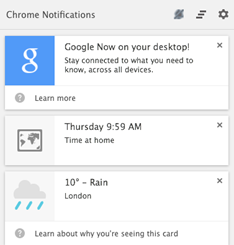
Google Canary is a developer/early adopter’s version of Google Chrome. If you install Google Canary, you have an option to enable Google Now. Google Now works like a packaged app on PC/Mac. Once you have installed Chrome Canary, just open chrome://flags/#enable-google-now and select enable from the drop down menu. Sign-in to Google Chrome and you are ready to roll. Google Now on PC/Mac will not only show almost every card that is available on Android or iOS, but also notifications from packaged apps like Gmail, Any.Do, Pocket.
1. Download and install Google Canary.
2. Open chrome://flags/#enable-google-now URL in Chrome Canary.
3. Enable Google Now.
4. Relaunch Chrome.
Google Now will be ready, waiting for you in the notification tootlbar for you PC/Mac.
Important links : Google Now | Google Canary | Tip Via : Chrome Blog
Google Now for Android | Google Play Store
Google Now for iOS | iTunes App Store
Google Now flashable zip for ICS Android | XDA developers
Recently Google launched a new app for Android called the Google Play Newsstand. It’s a consolidation of Google Currents and Play Magazines with a Cards based UI. Newsstand manages subscriptions of newspapers and magazines directly from Google Play. Unlike standalone apps by newspaper publishers and free content subscription apps like Flipboard and Google Currents, Newsstand offers paid subscriptions for high profile publications too.
The features that make Google Play Newsstand the best newsreader app yet are
The Offline mode solves the problem Currents had with high data and battery usage. Newsstand widely uses Google’s machine learning in tagging articles and finding newer and more enjoyable subscriptions for you to read.
You can subscribe to TechMef’s RSS feed here.
Google Play Newsstand | Google Play Store via The Verge
If your Android device doesn’t have a Snapdragon processor or the latest Android version, “This app isn’t compatible with your device” isn’t alien to you. If you are pretty sure that you old device can render the high graphics of the new game on Google Play or the amazing new app which requires Android version 4.0.4+ can run smoothly on your old device, but the Google Play’s ‘Awesome experience or nothing’ is stopping you; Evozi Online APK Downloader is here for your aid. Now you can move an app to a device without internet connection or can try it on a phone that isn’t officially supported.
Evozi Online APK Downloader is a web app that pulls APK files directly from Google’s servers. The web app needs the package name of the app you wish to download, to generate the download link. Package name is the part of the URL after id=
Plants vs. Zombies™ 2 :
https://play.google.com/store/apps/details?id=com.ea.game.pvz2_row&hl=en
Once you download the APK simply move it to your device, to install open it using any file manager. Android doesn’t allow installation from other sources, you may have to check the Settings > Security > Unknown sources
Get Package name > Generate Download link > Download the APK > Move the APK to your device > Open it using any file manager.
To prevent piracy – this web app work only with free apps. Once you have an APK, you can share it with friends directly from any file manager without the need of any other apps like Share App.
Evozi Online APK Downloader has a limited daily quota to pull out apps from Google Play, you can also download the Google Chrome Extension to get your APKs.
Evozi Online APK Downloader | Web app
Evozi APK Downloader | Google Chrome Extension
File Managers for Android
Action(s) is a Java app that aims to automate repetitive tasks like batch rotate photos, batch rename files, batch QR processing and a lot more. Such tasks are very easy to perform but are really time consuming. Action(s) lets you create a workflow by simple drag and drop scheme for every step in the process.
Action(s) is extremely lightweight (just about 2 KB) being a java app. Action(s) is very easy to use and if you tinker with it for about an hour, you will be quickly, efficiently and effortlessly commanding this software to perform your tasks.
Action(s) can do in seconds and minutes what would take you hours to do by hand. It gives you direct access and control of all the functionalities of your computer: file management, photo edition, Internet, emails.
Besides the huge default set of actions you can perform using Action(s), you can download even more packages here.
To get this automation tool you must install Java, click here to download Java.
Action(s) | via groovyPost
It has been almost an year since I posted an article about Flutter – an app that lets you control music with hand gestures. I’m re- reviewing Flutter because of two reason : First, Google acquired Flutter and second Flutter now has a Chrome extension that lets you use your webcam to control Netflix, YouTube, Grooveshark and Pandora. With added support to Spotify and Netfilx on Windows and Mac, Flutter’s Desktop app has a few updates too including the ability to control your Powerpoint slideshows. Put your hardware to use now with Flutter.
You can download the Flutter Chrome Extension from Chrome Web Store or by right-clicking on the Flutter icon in the notification tray.
Flutter for Windows
Flutter – Chrome Extension | Chrome Web Store
Flutter | Mac App Store
Remo is a lightweight and beautiful music player that can be controlled with a smartphone. You can simply drag and drop folders into the player and play your favorite music. Remo is available on Chrome Web Store – For Your Desktop. The player has no setting, no options or any customization other than the player controls. Remo should have a place reserved in your Chrome App Launcher.
Pocket is an app that lets you save content from the web (text, images, videos or pretty much anything) for later viewing. The cloud integration lets you read your content across various platforms. There are a lot of ‘Read it later’ apps, but Pocket might be the one with the largest coverage, Android, iOS, Kobo and all major browsers. The auto-download feature, lets you download content whenever the internet connection is available and that content can be used anytime later, even when you are offline.
Pocket has a great UI and customization. It can be optimized for text reading by altering the text size, inter-line spacing, brightness control and Day/Night mode similar to any good ebook reader. The image viewer and video viewers are both customizable too.
One of Pocket's biggest new features is the ability to filter by content type; you can sort by image, video, and traditional text. Filtering by video reveals a grid of thumbnails of videos you've saved across Vimeo, YouTube, and other services. Most videos saved from the web will automatically get categorized appropriately, but only YouTube and Vimeo videos will display a pop-up player in the app.
Other similar apps to Pocket are Readability and Instapaper. But unlike them Pocket doesn't offer any options for plugging into other social networks.
Pocket also has a chrome packaged app which can be used offline.
Pocket | Google Playstore
Pocket | AppStore
Text.app is a simple text editor for Chrome OS and Chrome. It’s Fast, allows multiple file editing at once, has syntax highlighting and syncs with Google Drive on Chrome OS. The Chrome app is available on Chrome Web Store.
After the post on ‘Google Keep or Evernote’ here is another pro for Google Keep, the packaged app on Chrome Web Store – For Your Desktop can be used offline. Earlier PC users had to open the Google Keep webpage, but now they can just install the app from the web store and open it using the Chrome App Launcher. If you do not wish to install the app, you can also install the Panel View for Keep extension from the Chrome Web Store. ‘Category Tabs for Google Keep’ is yet another extension that lets you categories notes on Google Keep.
Panel View for Keep | Chrome Web Store
Google Keep App (Works Offline) | Chrome Web Store
Category Tabs for Google Keep | Chrome Web Store
Google Keep | Browser app
Any.Do is a great task list app. This much appreciated, award winning app is now available on Chrome Web Store – For Your Desktop. Any.Do was one of the very first offline apps on Google Chrome. Although this Chrome app can be used offline, the experience is not as good as on Android or iOS as the ‘Plan Your Day’ feature is shredded. The app is available on the Chrome Web Store and once installed can be used from the Chrome App Launcher.
Google+ Hangouts – instant messaging and video chat platform by Google, has a Chrome packaged app apart from Android, iOS and web-app. Installing this extension enables the user to access Hangouts conversations without opening the Google+ or GMail webpages. Similar to Facebook’s Messenger for Windows, Hangouts extension can do almost everything Google Hangouts can do on other platforms. Although Hangouts is an extension it runs in the background waiting in the tray. Besides automatic sign-in and hide to tray options, it also features a snooze notification function. Hangouts is a must-have extension for Google Chrome.
After offline Wikipedia powered by Kiwik, here’s another tip to simplify your knowledge quests using Wikitube. Wikipedia and YouTube both are the widest source of anything and everything we need. An amazing amalgamation of the two just by using a Chrome extension can make your research more efficient.
Once you install this extension every Wikipedia article will have a handful of videos line up at the top of the article. You can click the red plus more ever more videos.
Wikitube from mark.dunne02 | Google Chrome Store
via Ghacks
has come up with a graphics card information utility tool for Windows users that gives a lot of information about many different parameters of on-board and dedicated graphics of your PC. This lightweight app can access the temperature sensor of your video card, which helps controlling the random overheating or thermal trips. Beside temperature, GPU-Z can measure GPU clocks, load, memory, VDDC required for every over-clocked GPU’s health check and maintenance. As a cherry on the top, it can also measure the number of transistors on your device ( Just to Brag!!)
GPU-Z is a freeware that runs on Windows XP / Vista / 7 / 8 (both 32 and 64 bit versions are supported). For more information visit www.techpowerup.com/gpuz
GPU-Z | Download link.
Wikipedia, the single most trusted source of all human knowledge can now be carried on a USB flash drive so you can ‘wiki’ stuff in the middle of an ocean, at the top on a mountain or in the jail. Kiwix is an open source project that allows you to carry the whole Wikipedia on different platforms like Windows, GNU/Linux, Mac OSX and Android. One can download the whole Wikipedia in English language in just ~18 GB. This highly compressed treasure of knowledge can be compressed even more by downloading the content without images. Apart from all this the full text search engine and PDF/HTML export.
You can download Kiwix here.
The Android package can be downloaded from Google Play Store here.
Automate all your TV shows torrent downloads.
µtorrent has an inbuilt feature called “RSS Feeds” which downloads torrents automatically as and when they update. All the major torrent search engines provide RSS feeds for various topics/catagories, but downloading TV shows season after season (which is a #PITA) is greatly simplified by RSS.
Downloading TV shows requires up-to-date following of schedules, searching suitable .torrent files and waiting for the download to finish. RSS feeds automates the first two steps. All you need is a computer,an internet connection and a torrent client (like µtorrent, BitTorrent, Vuze, etc.).
STEP 1: Visit Show RSS.
STEP 2: Register (No email id required)
STEP 3: Select the shows you follow from the drop down list and add them to your list.
STEP 4: Click on Feeds ( Available on the navigation bar below the ShowRSS logo).
STEP 5: Select the Quality and ‘Do Not Include PROPER/Repacks’ (To avoid duplicate downloads) and click on the ‘Generate’ button.
STEP 6: Copy the link (preferably the 1st) and open the torrent client (µtorrent, BitTorrent, Vuze).
STEP 7: Click on the file menu and select ‘Add RSS feed…’
STEP 8: Paste the feed URL and select ‘Automatically download items in the feed’.
STEP 9: Keep the torrent client running (most clients can be hid in the tray) all times.
Enjoy the automated downloads… Advanced users can right click on the ‘Feeds’ shortcut on the sidebar of their client and select ‘RSS Downloader’ to create and manage filters. The filters allow you to select the download priority and quality. Also may advance options can be tweaked on the filters window.
ShowRSS currently supports a lot of popular TV shows, but if you are looking for something else try EZRSS or TVrss or FeedMyTorrents.
Note taking apps are a major productivity booster. Making To-Do lists, taking notes, making image or voice reminders and syncing them over Web, phone or a tablet helps planning and scheduling your next move. With the rise of cloud services syncing everything over all your devices is easy, but selecting an app to do so is a tough job.
Google has released the Google Keep app for both the Web and Android devices. It's a small step in the right direction. But the question is Evernote, Microsoft Office OneNote, Any.Do, SpringPad, SimpleNote are already available on the market, so ‘Why Google Keep?’. To start with, I’m a big fan of Google’s developments so far. This might make me a little biased but after using a lot of productivity tools, it comes down to Google Keep or Evernote.
Why to keep ‘Keep’?
I’ve to confess right away that before Google Keep, Evernote was hands-down the best productivity app. But the minimalistic approach is always a WIN. The clutter free look, color coding the notes and the ability to dictate the notes (which are converted to text) are some of the features that I like.
My favorite features: As I visited sites on my phone, I could click a "share" link and save the site, including a preview image and the link, to Google Keep. That makes it a powerful bookmarking tool, even if that functionality only works currently for the mobile app, not the Web app. Also converting lists to checklists and snapping photos right from the app makes highly usable.
Google Keep lets you see all of your notes in a thumbnail view, which makes them easy to organize and find. On an android device, there's also a widget that makes it easy to create a new note or task list, snap a photo, or record a memo. The web app needs a few more changes, but if you are an android user: Keep the Keep.
Why Evernote?
Evernote has nothing to worry about because of the time to release advantage. Evernote is like ‘The Hulk’ of the note keeping Avengers. SHARING NOTES: The one feature that puts Evernote ahead of all. Also adding multiple sound, video clips or images to a single note ( For Keep 1 note = 1 multimedia file). Grouping notes together in different notebooks.
My favorite features: Powerful search that lets you search even in images, text and handwritten notes. Business features like invites, sharing with others, tagging, notebooks and stacks.Apart from all this adding other files like a report to a reminder, keeps stuff integrated under one roof.
Evernote is the most diverse and powerful productivity and note-making app out there. Google Keep is nice and simple, but very limited.
WINNER: Evernote provides users with a powerful note-taking platform, along with customization and infinite capabilities through apps and add-ons. Plus, Evernote's version for businesses is a win too. I might still keep my Keep, because it can do what I need to do, but Evernote is indeed a WINNER here.
Click here to visit the download page.