Showing posts with label Chrome. Show all posts

Friday, January 27, 2017

Quick Draw


Quick, Draw!

I've always been a fan of Google's Chrome Experiments like Super Sync Sports or 100,000 stars. This new experiment called Quick, Draw! lets you play the beloved party favorite - PICTIONARY!! (.. with an AI). This is a game based on a neural network. Every time you draw something the neural network tries to guess what are you drawing; And whilst doing so you are actually training the network too. From animals to objects, or from a rollercoaster to a laptop, you get to draw a lot of things. You can also see what others have drawn before, by clicking on the pictures you have drawn, at the end of each round. Although using a device with a touch input is much easier (for you too draw... the A.I is quite smart) using a mouse or any pointing device should work fine.

Quick, Draw! | via A.I Experiments with Google.

Thursday, February 13, 2014

Google Search Volume by Language : Chrome Experiment

Earth

The internet is beautiful, yet another Chrome experiment is here to support this argument. It’s open source and it’s amazing. I know it isn’t very useful, but it’s smart. Give it a try, playing around this was the best spent minute for me today.

Google Search Volume by Language | via Inside Google Search : Playground

Friday, January 31, 2014

Get Google Now on PC/Mac

 Chrome Canary

Google Now is a personal assistant service, something on the same lines with Apple’s Siri, but far more powerful. Google Now brings you just the right information, at just the right time. Weather, traffic, transit schedules, even the latest scores come automatically, just as you need them. Google Now is available for iOS and Android, but sadly, those of you who bought Ice-cream sandwich devices, and still haven't received a Jellybean update are refrained from using Google Now. Google Now, not being an easily installable app (like other Android apps), you might have to change you phone’s ROM or flash a Google Now flashable zip for ICS Android. google-now-chrome-mac

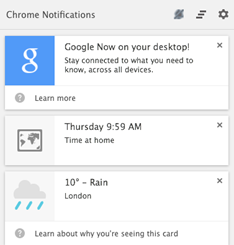
Google Canary is a developer/early adopter’s version of Google Chrome. If you install Google Canary, you have an option to enable Google Now. Google Now works like a packaged app on PC/Mac. Once you have installed Chrome Canary, just open chrome://flags/#enable-google-now and select enable from the drop down menu. Sign-in to Google Chrome and you are ready to roll. Google Now on PC/Mac will not only show almost every card that is available on Android or iOS, but also notifications from packaged apps like Gmail, Any.Do, Pocket.

google now steps


Steps to get Google Now on PC/Mac

1. Download and install Google Canary.

2. Open chrome://flags/#enable-google-now URL in Chrome Canary.

3. Enable Google Now.

4. Relaunch Chrome.

Google Now will be ready, waiting for you in the notification tootlbar for you PC/Mac.

Important links : Google Now | Google Canary | Tip Via : Chrome Blog

Google Now for Android | Google Play Store

Google Now for iOS | iTunes App Store

Google Now flashable zip for ICS Android | XDA developers

Friday, November 22, 2013

Super Sync Sports : Use your phone as a controller

Super Sync SportsThe Best Google Chrome Experiment yet. Google’s Super Sync Sport is a simple sports game and the aim race in different sports – Running, Swimming or cycling. What makes it different? Use of mobile phones as controllers. Upto 4 players can participate in a race, choose adorable characters from a huge roster and Get Set Race!!

Open Super Sync Sports on Google Chrome or download the Chrome app. Grab your phone(s) or tablet(s) and visit g.co/super. Enter Code to connect to the same session and start playing. Up to four players can join in every race.

Requirements:

  • A Computer that can run Google Chrome (Duh!)
  • Phone(s)/Tablet(s) (Android 4.0+ and iOS 4.3+) with Google Chrome installed.
  • Internet connection on all devices including the computer.

Super Sync Sports uses new browser technologies like the HTML5 audio, CSS3 and Canvas, and the Touch API to recognize the gestures you make on your mobile device and WebSockets to make sure your phone(s) and browser stay in sync similar to Remo Music player.

Super Sync Sports

Super Sync Sports | Web app | Google Chrome WebStore

Z-Type : Type to Shoot

Playing games can improve your hand-eye coordination, stimulate quick thinking and reduce reaction time. A lot of games help you learn how to fly an aircraft or be more social. Z-Type is a HTML5 game that helps you type faster. A simple, 2D, type to shoot game is a better alternative those boring softwares that are suppose to help you type faster. Dominic Zsablewski is a developer/blogger who has created games like Z-type, X-type, Biolab disaster, Drop, etc. All these games can be played on a browser, some have mobile browser compatibility too.

largeKilling time on Dominic’s webpage is really easy. It’s the place to find a lot of games, good reads and a lot of other stuff for free. Undertaking such projects brings out the potential of HTML5. Developing web apps instead of mobile apps or downloadable content is a better choice, as no one wants to download and install stuff when they get bored. All they have to do is open a web page and start playing.

Follow the Chrome Experiment here.

Z-type X-type | via Dominic Zsablewski

Biolab disaster | Google Play | App Store

100,000 Stars

If you think Google SkyMap is awesome, wait till you see 100,000 Stars. It’s a Google Chrome Experiment programmed by some space enthusiasts at Google. With highly immersive and interactive experience, this web app also displays tooltips from Wikipedia, making it informative. According to Google Chrome Experiments 100,000 Stars shows the location of 119,617 nearby stars.

Google's Joke

You can get started with the brief tutorial or just jump in with and travel the universe. Panning, zoom in, zoom out everything can be done with your pointing device. Click the star name to learn more things about it like the name of the discoverer, distance from Earth, approximate age and other information.

100000 stars

1000,000 Stars | via Chrome Experiments

World Wide Maze

WWMWe all know Teeter – the hugely popular ball and maze game. Now imagine any webpage as your maze board, add some fabulous graphics and some great 3D paths and you get ‘World Wide Maze’. Use your Android/IPhone or just your computer to play all you need is Google Chrome. This Chrome Experiment might be the best maze puzzle ever. You will never be bored of this because every webpage is a new playground. Just enter the URL or run a Google search and you are ready to go.

Gameplay–World Wide Maze

Hats-Off to Google Chrome Japan for this brilliant innovation.

World Wide Maze | via Chrome Experiments

Wednesday, November 20, 2013

Evozi Online APK Downloader : Sideload Android Apps


Evozi APK DLoaderIf your Android device doesn’t have a Snapdragon processor or the latest Android version, “This app isn’t compatible with your device” isn’t alien to you. If you are pretty sure that you old device can render the high graphics of the new game on Google Play or the amazing new app which requires Android version 4.0.4+ can run smoothly on your old device, but the Google Play’s ‘Awesome experience or nothing’ is stopping you; Evozi Online APK Downloader is here for your aid. Now you can move an app to a device without internet connection or can try it on a phone that isn’t officially supported. evozi

Evozi Online APK Downloader is a web app that pulls APK files directly from Google’s servers. The web app needs the package name of the app you wish to download, to generate the download link. Package name is the part of the URL after id=

Plants vs. Zombies™ 2 : https://play.google.com/store/apps/details?id=com.ea.game.pvz2_row&hl=en

Package name : com.ea.game.pvz2_row&hl=enScreenshot_2013-11-20-16-3912

Once you download the APK simply move it to your device, to install open it using any file manager. Android doesn’t allow installation from other sources, you may have to check the Settings > Security > Unknown sources

Get Package name > Generate Download link > Download the APK > Move the APK to your device > Open it using any file manager.

To prevent piracy – this web app work only with free apps. Once you have an APK, you can share it with friends directly from any file manager without the need of any other apps like Share App.

Evozi Online APK Downloader has a limited daily quota to pull out apps from Google Play, you can also download the Google Chrome Extension to get your APKs.

Evozi Online APK Downloader | Web app

Evozi APK Downloader | Google Chrome Extension

via Digital Inspiration

File Managers for Android

Astro FM EM explorer ES FE FM

Friday, October 4, 2013

Flutter

Flutter IconIt has been almost an year since I posted an article about Flutter – an app that lets you control music with hand gestures. I’m re- reviewing Flutter because of two reason : First, Google acquired Flutter and second Flutter now has a Chrome extension that lets you use your webcam to control Netflix, YouTube, Grooveshark and Pandora. With added support to Spotify and Netfilx on Windows and Mac, Flutter’s Desktop app has a few updates too including the ability to control your Powerpoint slideshows. Put your hardware to use now with Flutter.

You can download the Flutter Chrome Extension from Chrome Web Store or by right-clicking on the Flutter icon in the notification tray.

for Windows

– Chrome Extension | Chrome Web Store

| Mac App Store

Thursday, September 26, 2013

Best Of Chrome : Remo Music Player


Remo is a lightweight and beautiful music player that can be controlled with a smartphone. You can simply drag and drop folders into the player and play your favorite music. Remo is available on Chrome Web Store – For Your Desktop. The player has no setting, no options or any customization other than the player controls. Remo should have a place reserved in your Chrome App Launcher.

Remo Remo

Remo Music Player | Chrome Web Store

Pocket : Read It Later

Pocket

Pocket is an app that lets you save content from the web (text, images, videos or pretty much anything) for later viewing. The cloud integration lets you read your content across various platforms. There are a lot of ‘Read it later’ apps, but Pocket might be the one with the largest coverage, Android, iOS, Kobo and all major browsers. The auto-download feature, lets you download content whenever the internet connection is available and that content can be used anytime later, even when you are offline.

image view

reader 2

Pocket has a great UI and customization. It can be optimized for text reading by altering the text size, inter-line spacing, brightness control and Day/Night mode similar to any good ebook reader. The image viewer and video viewers are both customizable too.

One of Pocket's biggest new features is the ability to filter by content type; you can sort by image, video, and traditional text. Filtering by video reveals a grid of thumbnails of videos you've saved across Vimeo, YouTube, and other services. Most videos saved from the web will automatically get categorized appropriately, but only YouTube and Vimeo videos will display a pop-up player in the app.

Other similar apps to Pocket are Readability and Instapaper. But unlike them Pocket doesn't offer any options for plugging into other social networks.

Pocket also has a chrome packaged app which can be used offline.

Pocket | Google Playstore

Pocket | AppStore

Pocket | Chrome Web Store

Best Of Chrome : Text


textText.app is a simple text editor for Chrome OS and Chrome. It’s Fast, allows multiple file editing at once, has syntax highlighting and syncs with Google Drive on Chrome OS. The Chrome app is available on Chrome Web Store.

Text by joshwoodward@google.com | Chrome Web Store

Best Of Chrome : Google Keep


Google Keep

After the post on ‘Google Keep or Evernote’ here is another pro for Google Keep, the packaged app on Chrome Web Store – For Your Desktop can be used offline. Earlier PC users had to open the Google Keep webpage, but now they can just install the app from the web store and open it using the Chrome App Launcher. If you do not wish to install the app, you can also install the Panel View for Keep extension from the Chrome Web Store. ‘Category Tabs for Google Keep’ is yet another extension that lets you categories notes on Google Keep.

Panel View for Keep | Chrome Web Store

Google Keep App (Works Offline) | Chrome Web Store

Category Tabs for Google Keep | Chrome Web Store

Google Keep | Browser app

Best Of Chrome : Any.Do


icon

Any.Do is a great task list app. This much appreciated, award winning app is now available on Chrome Web Store – For Your Desktop. Any.Do was one of the very first offline apps on Google Chrome. Although this Chrome app can be used offline, the experience is not as good as on Android or iOS as the ‘Plan Your Day’ feature is shredded. The app is available on the Chrome Web Store and once installed can be used from the Chrome App Launcher.

Any.Do | Chrome Web Store

http://www.any.do/

Best Of Chrome : Hangouts


icon

Google+ Hangouts – instant messaging and video chat platform by Google, has a Chrome packaged app apart from Android, iOS and web-app. Installing this extension enables the user to access Hangouts conversations without opening the Google+ or GMail webpages. Similar to Facebook’s Messenger for Windows, Hangouts extension can do almost everything Google Hangouts can do on other platforms. Although Hangouts is an extension it runs in the background waiting in the tray. Besides automatic sign-in and hide to tray options, it also features a snooze notification function. Hangouts is a must-have extension for Google Chrome.

Hangouts Extension | Chrome Web Store

Google